Grandma-Test Difficulty: 0/5 — Open a Link and Draw
Try-It Time: 30 seconds to first doodle
Worth Your Time: 5/5 — Do Not Miss
—
You don’t need Photoshop. You don’t need Procreate. You don’t even need to install anything. If you’ve ever missed the simple joy of MS Paint — the spray can, the jagged polygon tool, the satisfaction of filling a closed shape with the paint bucket — it’s waiting for you at jspaint.app right now.
JS Paint is a pixel-perfect, browser-based remake of classic Microsoft Paint (the Windows 95/XP version, not the ribbon one). It loads in seconds, works on phones and tablets, and recreates every tool, menu, and quirk of the original — plus a pile of modern upgrades the original never had [S1][S2].
What You Need
- A web browser (Chrome, Firefox, Safari, Edge — anything from the last five years)
- Zero accounts, zero downloads, zero terminal commands
- Optional: a mouse or trackpad (touch works too)
Simple Setup Walkthrough (3 Steps)
Step 1: Open the site
“ https://jspaint.app “
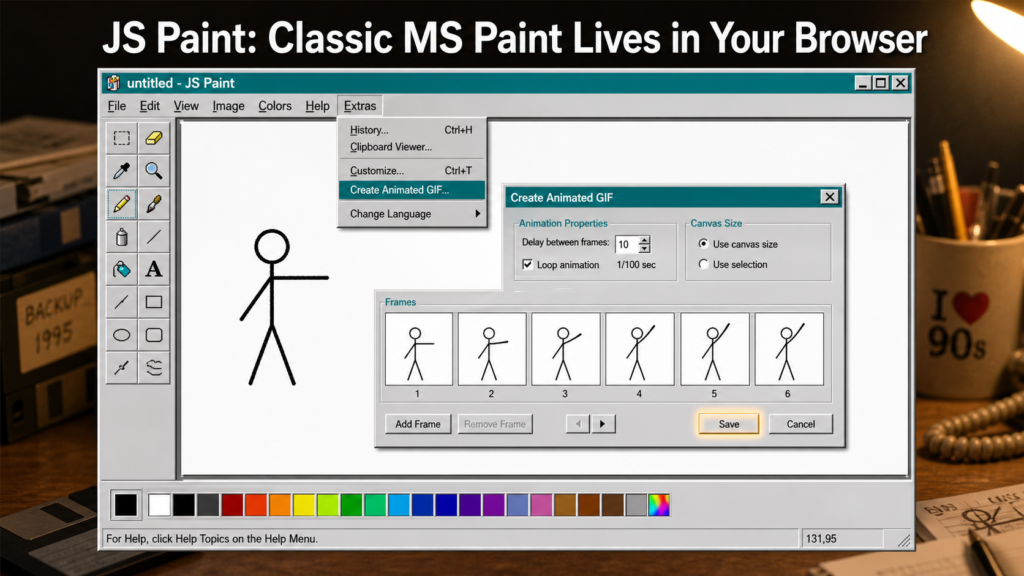
That’s it. The app loads instantly. You’ll see the classic Paint window: toolbox on the left, color palette at the bottom, blank canvas in the middle.
Step 2: Pick a tool and start drawing
Click the Pencil tool (top-left icon), choose a color from the palette, and drag on the canvas. Try the Spray Can (hold and wiggle), the Paint Bucket (click inside a closed shape), or the Text tool (click anywhere, type, click outside to place).
Step 3: Save your masterpiece
Press Ctrl+S (or File → Save) and choose PNG. The file downloads to your computer. You can also File → Save As → GIF to make an animated GIF from your undo history — more on that in a moment [S1][S2].
First Thing to Try: Make an Animated GIF in 60 Seconds
This is the feature that made me grin. JS Paint can turn your drawing session into an animated GIF automatically:
- Draw something — a stick figure, a bouncing ball, a growing tree, anything
- Make a few strokes, pause, make a few more (each stroke becomes a frame)
- Press Ctrl+Shift+G (or Extras → Create Animated GIF)
- Adjust the frame delay if you want, click Save, done
You now have a looping animated GIF of your drawing process. Share it in a chat, drop it in a document, post it somewhere. No screen recorder, no video editor, no timeline — just draw and export [S1][S3].
Turn It Into a Game or Challenge
- Speedrun a doodle: Set a timer for 60 seconds. Draw “a cat riding a skateboard” or “your breakfast.” Export the GIF. Send it to a friend.
- Palette swap: Open Extras → Themes → Winter. The color palette becomes an advent calendar — click each flap to reveal a pixel-art surprise. Try drawing using only the Winter palette.
- Collaborative chaos: Open jspaint.app/#session:multi-user-test, send the link to a friend. You’ll both draw on the same canvas at the same time. It’s messy, laggy, and hilarious [S1].
- Transparent layer trick: Image → Attributes → Transparent, then Image → Clear Image. Now the eraser actually erases to transparency. Draw a character, erase the background, save as PNG — instant transparent sprite.
Optional Expert Rabbit Hole
If you want to go deeper, JS Paint has surprising depth:
- Nonlinear undo history: Press Ctrl+Shift+Y (or Edit → History) to see a tree of every branch you’ve created. Jump to any past state without losing alternate timelines. This is version control for doodles [S1].
- Desktop app: Download the AppImage (Linux), .dmg (macOS), or .exe (Windows) from the releases page for native file associations, wallpaper setting, and offline use [S3].
- Accessibility suite: Extras → Dwell Clicker lets you click by hovering (great for eye/head trackers). Extras → Speech Recognition lets you say “fill tool, orange” or “scroll down and left” to control the app by voice [S1][S3].
- Embedding API: Developers can embed JS Paint in their own web apps with a JavaScript API [S3].
One Thing to Know
Clipboard support varies by browser. In Chrome 76+, copy/paste works fully with external images. In Firefox and Safari, you can copy from JS Paint and paste into JS Paint, but pasting from other apps may not work. Drag-and-drop an image file onto the canvas works everywhere [S1].
Also: the multi-user collaboration is experimental — sessions aren’t private, and actions can interrupt each other. Treat it as a toy, not a production tool [S1].
The Bottom Line
Best for: Anyone who wants to doodle, annotate a screenshot, make a quick meme, create a transparent PNG sprite, or export an animated GIF of a drawing — right now, with zero friction.
Skip if: You need layers, vector tools, pressure sensitivity, or professional image editing. This is MS Paint, not Photoshop.
Verdict: JS Paint is a rare thing — a nostalgia trip that’s genuinely useful. It loads faster than any native app installs, runs on any device with a browser, and the animated GIF export alone makes it worth bookmarking. Open it, draw something stupid, laugh, share it. That’s the point.
—
Edition Close
Best Use of Your Time Today: Open jspaint.app, draw a terrible stick-figure animation, export the GIF, send it to someone who’ll appreciate the chaos.
Safe to Skip: The desktop app unless you specifically want file associations or offline access. The browser version is 95% of the experience.
The Bottom Line: JS Paint proves the best tool is the one that’s already open. Zero install. Zero learning curve. Pure fun.
Sources
- [S1] JS Paint — GitHub Repository — Isaiah Odhner (1j01) (2026-04-10)
- [S2] JS Paint — Official Website (jspaint.app) — Isaiah Odhner (2026-04-10)
- [S3] JS Paint v1.1.0 Release Notes — Isaiah Odhner (2026-04-10)