Play Conway’s Game of Life as Arcade Games — Zero Install, 60 Seconds to Fun
The Hook
You’ve seen Conway’s Game of Life before — a grid of cells that live, die, and birth neighbors based on simple rules. It’s beautiful math, but usually you just watch it. What if you could play it? What if those traveling gliders became missiles you defend against, or spaceships you shoot down, or patterns you place like tower-defense turrets?
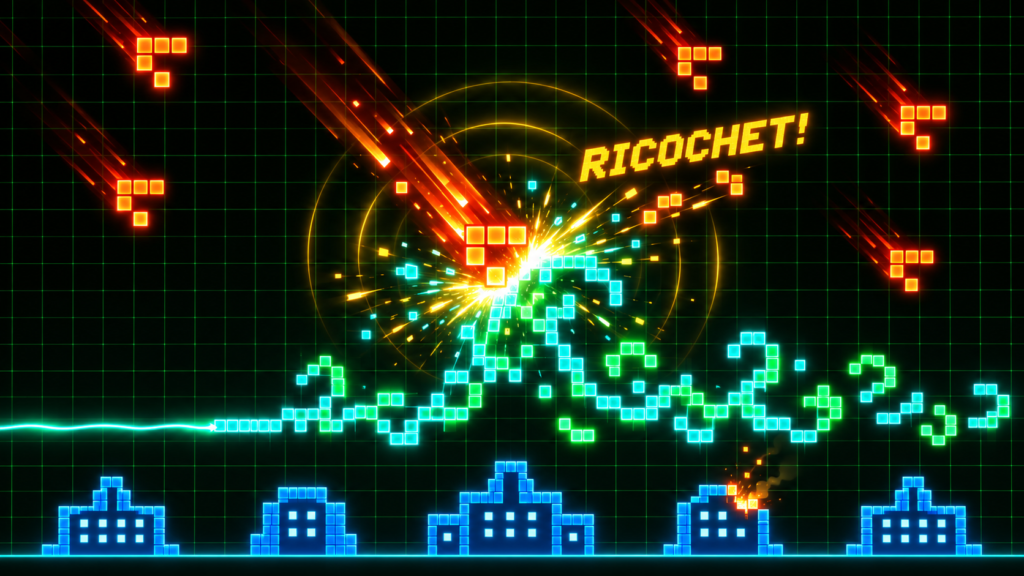
That’s exactly what The Arcade of Life does. Open a link, pick a mode, and you’re drawing living defenses that evolve in real time to stop enemy patterns. It’s Conway’s Game of Life reimagined as Missile Defender, Space Invaders, and Tower Defense — all in your browser, zero install. This is the rare project that delivers on the B.Y.E. promise: instant fun for complete beginners, with genuine depth for experts who want to peel back the layers.
At a Glance
| | | |—|—| | Grandma-test difficulty | 0/5 — Open link, click, play | | Try-it time | 30 seconds to first game | | Worth your time | 5/5 — Do Not Miss |
What You Need
- A modern browser (Chrome, Firefox, Safari, Edge)
- Internet connection for the initial load (~500 KB)
- That’s it. No account, no download, no terminal, no Python, no Node.
Simple Setup Walkthrough
1. Open the game
Go to https://aol.cognotik.com. The main menu loads instantly [S1][S2]. No splash screen, no login, no cookie banner. Just a clean menu with four game modes and a settings gear.
2. Pick a game mode
Click Missile Defender for the classic experience — your cities are under attack, draw cells to intercept incoming gliders. Or try Space Invaders (shoot gliders upward at descending formations), Tower Defense Simulator (place barriers and fire tiles before the wave, then watch your defenses hold or crumble), or Fire Line (a spectator-friendly light show where two glider guns duel across a line of fire cells).
3. Draw your first defense
In Missile Defender, your draw zone is the lower portion of the grid. Click and drag to paint Defense ink (blue/green). Your cells will evolve according to Conway’s rules — they grow, spread, and collide with enemy gliders [S1][S2]. The drawing tools are intuitive: freehand, line, rectangle, ellipse, fill bucket, and pattern stamp.
4. Watch the magic
Press Space to unpause. Enemy gliders (red/orange) descend from the top. Your drawn cells evolve each generation — a horizontal line becomes a spreading wave, a glider you drew becomes a diagonal missile. They intercept. Cities survive. You grin. The visual feedback is immediate: particle bursts at collisions, shockwave rings, floating arcade text like “RETURN FIRE!” and “RICOCHET!” [S1][S2].
5. Try another mode
Click Escape → Main Menu → Space Invaders. Now you shoot gliders upward at descending spaceships. Right-click to rotate your glider before firing. Different feel, same living math. In Tower Defense, you pre-place barriers and fire tiles, then commit — the simulation runs and you watch your puzzle solution play out.
First Thing to Try
Play Missile Defender level “Pillbox.” It is the curated intro level. Draw a horizontal line. Unpause. Watch it become a wave that catches multiple gliders. That “wait, that worked?!” moment is the point. Then draw a glider shape (three cells in an L). Watch it become a diagonal missile you aimed.
Turn It Into a Game or Challenge
Beat all curated levels: Pillbox, Firewalls, Mothership, Petri, Fire Line, TDS, Invaders. Each teaches a different mechanic. Switch rulesets mid-game: open Settings, choose Ruleset, try HighLife, Seeds, or Day & Night. The game feels different under each [S1]. Build your own level: open the Level Designer, place cities, bases, spawners, ink regions. Save as JSON. Share with a friend. Browse the Pattern Zoo: search for “glider gun” or “pulsar.” Stamp patterns into your game. Rotate (R) and mirror (X/Y). The editor lets you create custom patterns. Install as PWA: click the install icon, choose Add to Home Screen, play offline [S1][S2]. Works on phones, tablets, desktop.
Optional Expert Rabbit Hole
- 50+ rulesets: Conway (B3/S23), HighLife (B36/S23), Day & Night (B3678/S34678), Seeds (B2/S), Brian’s Brain, Wireworld, Langton’s Ant, plus hexagonal/triangular grids and custom neighborhoods [S1].
- Hashlife memoization: Toggle in Settings → Simulation → Hashlife Cache — speeds up large static defense regions exponentially by memoizing repeating patterns.
- WebGL2 backend: Switch from CPU to GPU simulation for massive grids (thousands of cells at 60 FPS).
- Console cheats: Open DevTools, type
cheats.help()—cheats.vfxStats(),CONFIGfor live settings mutation, custom pattern injection. - Hack the source: Zero dependencies, pure ES6 modules. Add a ruleset in
src/rules/extraRulesets.js, a pattern insrc/patterns/library.js, a game mode insrc/config.js[S1]. The codebase is intentionally hackable.
One Thing to Know
The project has very low GitHub visibility (0 stars) — not because it’s incomplete, but because it’s a personal passion project released quietly. The live demo is fully functional, feature-complete, and actively maintained. Don’t let the star count fool you; the code quality and depth are exceptional [S1].
The Bottom Line
Try it tonight if: You want instant, zero-friction fun that makes you feel clever. You like retro arcade games. You’ve heard of Conway’s Game of Life but never played it. You want to show someone “look, math is actually a game.”
Skip if: You only want AAA graphics or narrative-driven games. You need persistent progression across sessions (progress saves to localStorage but there’s no cloud sync). You’re on a very old browser without ES6 module support.
The verdict: This is B.Y.E. gold — Tier 1 Instant Click. Open the link, play for five minutes, and you’ll understand cellular automata better than any textbook could explain. The fact that it’s free, offline-capable, and hackable is just icing.
Sources
- [S1] The Arcade of Life — GitHub Repository — GitHub / SimiaCryptus (2026-06-05)
- [S2] The Arcade of Life — Live Demo — SimiaCryptus (2026-06-05)
- [S3] Conway's Game of Life — LifeWiki — ConwayLife.com (2024-01-15)