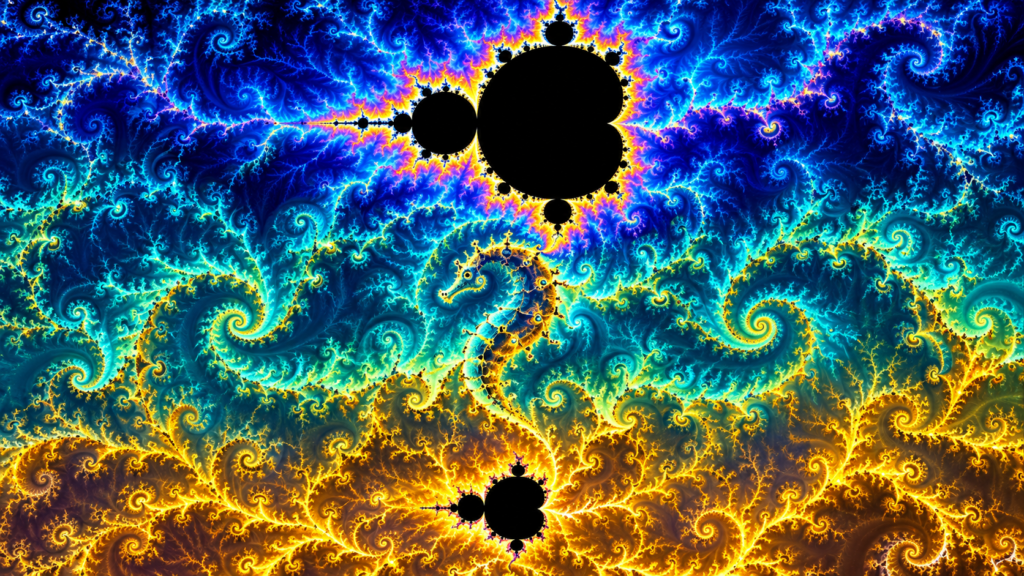
You have seen the Mandelbrot set in screen savers, math textbooks, and trippy YouTube videos — that infinite, self-similar swirl where every zoom reveals new coastline, new spirals, new worlds. Usually, exploring it means installing Python, wrestling with dependencies, or waiting for a render. Not today.
The Mandelbrot Fractal Generator (https://fractal.rafgraph.dev) is a zero-install, browser-based explorer that puts the full fractal at your fingertips in under ten seconds. Click Launch Fractal and you are instantly inside — fullscreen, colorful, and ready to zoom forever [S1][S2].
At a Glance
Grandma-test difficulty: 0/5 — Open a link and interact; no account or install
Try-it time: Under 30 seconds to first fractal; 5 minutes to lose yourself
Worth your time: 5/5 — Do Not Miss. Instant mathematical wonder, zero friction, works on phone or desktop.
What You Need
- A web browser (Chrome, Firefox, Safari, Edge — anything from the last 5 years)
- Internet connection (loads once, then works offline-ish)
- Optional: a mouse with a scroll wheel, or a touchscreen
That is it. No Python, no Node, no Docker, no terminal, no account.
Simple Setup Walkthrough
- Open the link — Go to https://fractal.rafgraph.dev in your browser [S2].
- Click Launch Fractal — The big button on the page. The fractal fills your screen in fullscreen mode [S3].
- Wait 2 to 3 seconds — A brief loading fractal overlay appears while the first frame renders [S4].
- You are in — The Mandelbrot set appears in full color, centered on the classic view.
That is the entire setup. Three clicks, zero install, under 30 seconds.
First Thing to Try
Click anywhere on the fractal.
The view instantly re-centers and zooms in on that point. New detail emerges — spirals, seahorses, islands, filaments. Click again. And again. Each click doubles the magnification. There is no end — the fractal is mathematically infinite, limited only by browser floating-point precision (around 10^15x zoom before things get blocky) [S4].
Alt+click (Option+click on Mac) to zoom out. Two-finger tap on mobile does the same [S4].
Shift+click to reset to the full fractal view. Three-finger tap on mobile [S4].
Press ESC to exit fullscreen and return to the launch page. Four-finger tap on mobile [S4].
Try this sequence: click the center of the main cardioid (the big heart shape). Zoom in five times. You will see a spiral pattern emerge. Click the center of that spiral. Zoom five more times. A miniature Mandelbrot set appears — a perfect, tiny copy of the whole thing, floating in the tendrils. This self-similarity at all scales is the defining property of the Mandelbrot set, and you just witnessed it with your own clicks.
Turn It Into a Game or Challenge
Find the Mini-Mandelbrot — Somewhere in the fractal, at high zoom, a perfect miniature copy of the entire set appears. Challenge yourself (or a friend) to find one. Hint: follow the tendrils off the main cardioid.
Color Hunt — Return to the launch page and try the higher escape-time links: 448, 896, or 1792 (warning: 1792 is slow). Each renders the same coordinates with a different color palette — up to 1,792 colors across seven algorithmic cases [S3]. Compare screenshots.
Zoom Coordinate Share — The fractal remembers where you zoomed. Exit to the launch page, pick a different escape time, and relaunch — you will resume at the exact same coordinates with new colors [S3].
Screenshot Swap — Take a screenshot at a beautiful zoom level. Send it to a friend with the challenge: Find this spot. They can navigate to it by following the visual landmarks — the seahorse valley, the double spiral, the island chain.
Optional Expert Rabbit Hole
The project splits cleanly into two files: app.js (UI, input, fullscreen) and fractal.js (pure math, rendering, coloring) [S3]. The fractal.js module exposes a simple API — you can embed just the fractal engine in your own page, control coordinates, escape time, canvas size, and distortion programmatically [S3]. The coloring algorithm is a clever 7-case RGB sweep that yields up to 1,792 distinct colors without any palette lookup tables [S3]. Licensed GPL-3.0, so you can fork, modify, and embed freely [S1].
If you want to go deeper, the fractal.js API accepts an options object with keys for pixel width, pixel height, cartesian coordinates (xCartMin, xCartMax, yCartMin, yCartMax), maximum escape time, zoom points, and distortion settings. You could build a custom fractal art generator, a screensaver, or a background for a creative coding project. The zero-dependency design means it drops into any vanilla JavaScript project without build steps.
One Thing to Know
The project has not been updated since 2018. It still works perfectly in modern browsers, but do not expect new features, bug fixes, or a WebAssembly port. At extreme zoom levels (past ~10^15x), JavaScript’s 64-bit floats run out of precision and the fractal turns into blocks — this is a fundamental limit of the language, not a bug [S4]. The lack of updates also means no WebGL acceleration, so rendering at high escape times (1792) can take several seconds on slower devices.
The Bottom Line
Try it tonight if: You want to experience mathematical infinity in your browser right now, zero friction, immediate wonder. Works equally well on a phone during a commute or a 27-inch desktop monitor.
Skip it if: You need exportable high-resolution images, parameter animation, or GPU-accelerated deep zoom — this is a toy, not a research tool. For that, look at Fraqtive, Kalles Fraktaler, or Mandelbulb3D.
The Mandelbrot Fractal Generator does one thing — lets you explore the Mandelbrot set interactively — and does it with zero ceremony. Open the link. Click launch. Lose ten minutes. Remember why math is beautiful.
Sources
- [S1] Mandelbrot Fractal Generator – GitHub Repository — GitHub (rafgraph/fractal) (2016-01-01)
- [S2] Mandelbrot Fractal – Live Demo — Rafael Pedicini (fractal.rafgraph.dev) (2016-01-01)
- [S3] Mandelbrot Fractal Generator README (gh-pages branch) — Rafael Pedicini (2016-01-01)
- [S4] Mandelbrot Fractal Generator app.js (gh-pages branch) — Rafael Pedicini (2016-01-01)