The Local LLM Stack Has a Missing Middle
For two years, the local LLM choice has felt binary: Ollama for the ergonomic path (one command, model names, OpenAI-compatible API, automatic GPU detection) or raw llama.cpp for the control path (exact GGUF files, explicit GPU layer offload, per-server KV cache tuning, newest features first).
Ollama wins on developer experience. llama.cpp wins on precision. But there’s a gap: what if you want Ollama’s CLI and upstream builds and the full Hugging Face registry and no daemon?
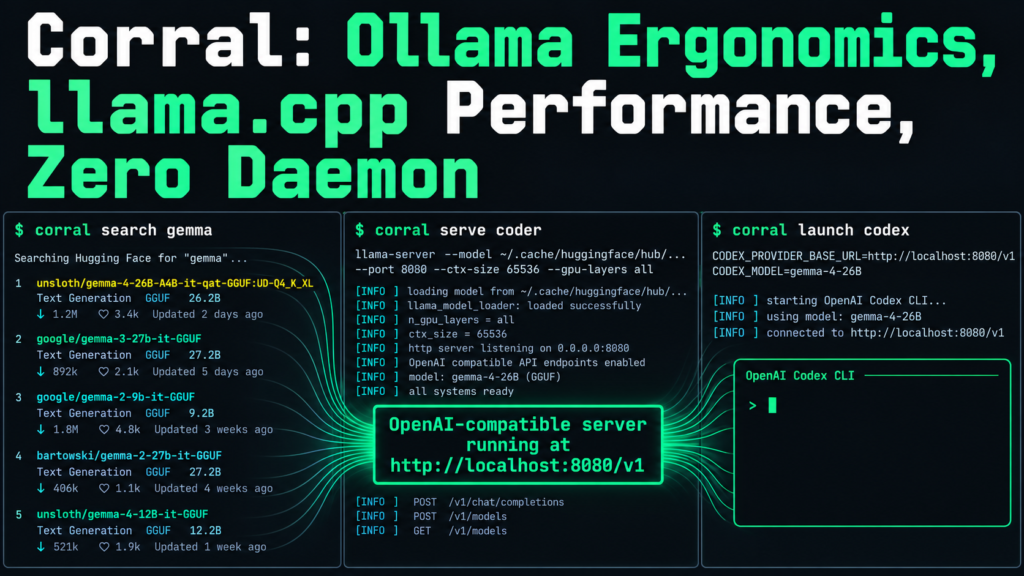
Enter Corral — a single POSIX shell script that installs official llama.cpp releases and MLX main-branch commits, speaks Ollama’s command language, searches all of Hugging Face, and launches OpenCode, Pi, Codex, or Copilot against your local server with one command [S1].
Grandma-test difficulty: 1/5 — One curl, one
corral install, thencorral run gemma
Try-it time: 3 minutes to first local chat (download + launch)
Worth your time: 4/5 — Strong Look: the practical middle ground between appliance and engine
What You Need
- macOS (Apple Silicon or Intel) or Linux (x86_64 or arm64)
curl,tar,jq, and standard POSIX tools (present on virtually all systems)- For MLX on Mac:
uv(Corral offers to install via Homebrew) - 4–8 GB free RAM for 7B-class models at Q4_K_M
No Docker. No systemd. No background service. No account.
Simple Setup Walkthrough
Step 1: Install Corral
“bash curl -fsSL https://github.com/mmonteleone/corral/releases/latest/download/corral \ -o ~/.local/bin/corral && chmod +x ~/.local/bin/corral export PATH="$HOME/.local/bin:$PATH" # add to ~/.zshrc or ~/.bashrc permanently “
On macOS, ~/.local/bin isn’t in $PATH by default — the export fixes that [S1].
Step 2: Install Backends and Completions
“bash corral install “
On Apple Silicon this installs both llama.cpp (llama-cli, llama-server) and MLX (mlx-lm) from the upstream main branch. On Linux, llama.cpp only. Restrict with --backend llama.cpp or --backend mlx [S1]. The script downloads the latest official llama.cpp release, adds it to $PATH, and installs shell completions for fish, zsh, and bash.
Step 3: Find a Model
“bash corral search gemma # GGUF-tagged models (llama.cpp) corral search --backend mlx gemma # MLX-tagged models corral search --backend llama.cpp qwen --quants # show GGUF quant variants “
This queries the full Hugging Face registry, not a curated subset [S1]. You see every compatible model, not just what a maintainer approved.
Step 4: Run It
“bash corral run unsloth/gemma-4-26B-A4B-it-qat-GGUF:UD-Q4_K_XL “
The :UD-Q4_K_XL suffix pins the quantization. Omit it for the default quant. MLX models use plain IDs (e.g., mlx-community/gemma-4-26b-a4b-it-4bit) [S1]. First run downloads to the standard HF cache (~/.cache/huggingface/hub/) — visible to every other tool you use [S1].
Step 5: Serve an OpenAI-Compatible Endpoint
“bash corral serve unsloth/gemma-4-26B-A4B-it-qat-GGUF:UD-Q4_K_XL “
This starts llama-server (or mlx_lm.server) on http://localhost:8080/v1 — drop-in compatible with OpenAI SDKs, LangChain, LlamaIndex, Continue, Aider, and the rest [S1].
First Thing to Try
“bash corral run unsloth/gemma-4-26B-A4B-it-qat-GGUF:UD-Q4_K_XL “
You’re chatting with a local model in under three minutes. No daemon started, no model imported into a registry, no Modelfile to write. The GGUF lives in the standard HF cache where llama.cpp, Ollama, LM Studio, and Jan can all see it [S1].
Turn It Into a Workflow: Profiles and Launchers
Save a Profile (Model + Flags = One Name)
“bash corral profile coder unsloth/gemma-4-26B-A4B-it-qat-GGUF:UD-Q4_K_XL -- \ --ctx-size 65536 --temp 0.5 --gpu-layers all corral serve coder corral run coder -- --temp 0.7 # inline flags override profile “
Profiles are plain text in ~/.config/corral/profiles/ with section headers for backend/command scoping ([llama.cpp.serve], [mlx.run], etc.) [S1].
Launch a Coding Harness Against Your Local Model
“bash corral serve coder # terminal 1 corral launch pi # terminal 2 — opens pi configured for your local endpoint corral launch opencode corral launch codex corral launch copilot corral launch code # VS Code Copilot “
corral launch inspects running servers via corral ps, matches the local OpenAI-compatible endpoint, model, context window, and max tokens, and configures the harness for that invocation. Existing configs are backed up with timestamps [S1].
Built-in Templates
“bash corral profile gemma-coder gemma # seeds from built-in 'gemma' template corral profile qwen-coder qwen corral profile glimmer-chat glimmer “
Templates are reusable flag sets (model optional). User templates in ~/.config/corral/templates/ override built-ins [S1].
Why This Exists: The Honest Gap
| Need | Ollama | Raw llama.cpp | Corral | |—|—|—|—| | One-command chat | ollama run gemma | ❌ Manual GGUF + flags | corral run gemma | | Upstream builds | Pinned, patched revision | ✅ You choose | ✅ Official releases + MLX main | | Full HF registry | Curated library only | ✅ Manual URL | ✅ corral search | | No daemon | ❌ ollama serve always | ✅ You control | ✅ No daemon | | Exact GGUF control | Indirect via Modelfile | ✅ Direct file | ✅ :QUANT suffix | | Tool launchers | Manual config | Manual config | corral launch pi|opencode|codex|copilot|code | | KV cache tuning | Global only | ✅ Per-server | ✅ Via profile sections | | Shell completions | ❌ | ❌ | ✅ fish, zsh, bash |
The core trade-off Ollama makes: it pins a llama.cpp revision, applies patches, and runs a scheduler. This gives you a stable appliance but delays upstream features (new quantization types, MTP drafting, flash attention improvements) until the next Ollama release [S3]. Corral tracks official releases and MLX main branch directly [S1][S2].
The core trade-off raw llama.cpp makes: you operate the server process and its flags. Maximum control, but every deploy is a custom command line. Corral saves that command line as a profile — reviewable, versionable, shareable [S1].
Performance: Inherit the Engine
On the same GGUF and hardware, Corral’s llama.cpp backend matches raw llama-server performance (10–25% faster than Ollama’s wrapped path) because there’s no wrapper overhead [S3][S4]. On Apple Silicon, the MLX backend is the fastest Mac inference path — Ollama 0.19+ also uses MLX, but Corral tracks main-branch commits [S1][S4].
Multi-Token Prediction (MTP) Drafting
For models supporting MTP (e.g., Gemma 4 with MTP sidecars), Corral downloads the sidecar automatically on pull or run. Uncomment in your profile to enable:
“`bash
–spec-type draft-mtp
–spec-draft-n-max 3
“`
Sidecars are excluded from corral list to keep your view focused [S1].
One Thing to Know
Corral is a convenience wrapper, not a new runtime. It doesn’t change how llama.cpp or MLX execute — it only manages installation, model discovery, and command ergonomics. If a model fails, the error comes from the underlying engine. Debug with llama-server --help or mlx_lm.server --help directly [S1].
Also: MLX is Apple Silicon only. On Linux or Intel Mac, you get llama.cpp only [S1].
The Bottom Line
Best use today: corral install && corral run gemma — three minutes to a local model with upstream builds, full HF search, and a saved profile you can launch OpenCode against.
Safe to skip: If Ollama’s curated library and daemon model work for you, Corral adds complexity without changing the inference result. The engine is the same.
Bottom line: Corral doesn’t replace Ollama or llama.cpp — it sits between them. For developers who’ve outgrown the appliance but don’t want to hand-craft every server invocation, it’s the ergonomic upgrade that keeps the engine exposed. One script. Upstream builds. Your registry. Your tools. No daemon.
Sources
- [S1] Corral: Ollama-shaped llama.cpp, MLX, and model management without Ollama — GitHub (mmonteleone/corral) (2026-09-13)
- [S2] Release v0.4.0 – Track latest mlx-lm main commits, update default templates — GitHub Releases (2026-09-13)
- [S3] llama.cpp vs Ollama in 2026: Which Runtime Should You Run? — DEV Community (rosgluk) (2026-09-15)
- [S4] The Complete Guide to Local LLM Inference Tools in July 2026 — DEV Community (sreeraj-sreenivasan) (2026-07-15)