Microsoft Conductor: Run Multi-Agent AI Workflows Like CI/CD Pipelines
You’ve built the agents. You’ve tuned the prompts. Now you need them to work together — reliably, repeatedly, and without burning tokens on orchestration logic.
Most teams solve this by writing Python scripts that chain prompts, manage state, and handle retries. The code works until it doesn’t: a prompt change breaks the flow, a retry loop spins forever, or you can’t explain to a reviewer why the agent took a particular branch.
Microsoft Conductor takes a different approach. It’s an open-source CLI (MIT license, Microsoft org) that lets you define multi-agent workflows in YAML [S1]. The routing is deterministic — Jinja2 templates and expression evaluation, first-match-wins — and consumes zero LLM tokens. The workflow topology is declared, not discovered at runtime [S2].
What Conductor Actually Is
Conductor is not an agent framework. It’s a workflow engine that reads YAML, calls models (GitHub Copilot, Anthropic Claude, or experimental providers), and produces structured output. Think of it as GitHub Actions for AI agents — same declarative philosophy, same diffable files, same audit trail [S1, S2].
A minimal workflow looks like this:
“yaml workflow: name: simple-qa entry_point: answerer runtime: provider: copilot default_model: gpt-5.2 agents: - name: answerer prompt: 'Answer: { { workflow.input.question } }' output: answer: type: string routes: - to: $end output: answer: "{ { answerer.output.answer } }" “
Run it:
“bash conductor run simple-qa.yaml --input question="What is Python?" “
The CLI validates the schema, executes the agent, and returns structured JSON. No Python glue required [S3, S7].
Installation: One Line, Multiple Options
Conductor installs in seconds. The recommended path uses Microsoft’s install script (handles file-lock safety, retries, version verification):
“`bash
macOS / Linux
curl -sSfL https://aka.ms/conductor/install.sh | sh
Windows PowerShell
$env:CONDUCTOR_INSTALL_EXTRAS = ‘tui’; irm https://aka.ms/conductor/install.ps1 | iex “`
The --extras tui flag adds the interactive Fleet Manager TUI. Alternatives:
“`bash
uv tool (fast, isolated)
uv tool install git+https://github.com/microsoft/conductor.git
pipx (user-space, managed)
pipx install git+https://github.com/microsoft/conductor.git
pip (global or venv)
pip install git+https://github.com/microsoft/conductor.git “`
All methods install the conductor command. Verify with conductor --version [S1, S3].
The Mental Model: Agents as Steps, Routing as Config
In Conductor, an agent is a single LLM call with its own session, system prompt, model, provider, and temperature. Agents don’t share conversation history — each gets an isolated context snapshot [S2, S4]. This isolation seems like overhead until you’re debugging a workflow where step 4 is mysteriously influenced by step 2’s output. Explicit context flow makes multi-agent systems tractable [S2].
Routing uses Jinja2 templates evaluated against the workflow context. First matching condition wins. No LLM decides what runs next:
“yaml agents: - name: classifier prompt: 'Classify: { { workflow.input.text } }' output: category: type: string routes: - to: technical_writer when: '{ { output.category == 'technical' } }' - to: creative_writer when: '{ { output.category == 'creative' } }' - to: $end “
The routing layer consumes zero tokens. A workflow can loop hundreds of times through an evaluator-optimizer cycle without orchestration overhead [S2, S4].
Mix Providers and Models Per Agent
Different agents, different strengths. Conductor supports per-agent provider overrides in a single workflow:
“yaml workflow: runtime: provider: copilot # default default_model: gpt-5.2 agents: - name: fast_classifier provider: claude # override model: claude-haiku-4.5 prompt: 'Classify: { { workflow.input.text } }' - name: deep_researcher provider: copilot model: gpt-5.2 prompt: 'Research: { { fast_classifier.output.category } }' tools: [web-search] # MCP tool access “
Each agent gets its own session with the specified provider and model. The tools field connects MCP servers configured at the workflow level [S1, S4, S7].
Parallel Execution: Static and Dynamic
Static Parallel Groups
Run independent agents concurrently with configurable failure modes:
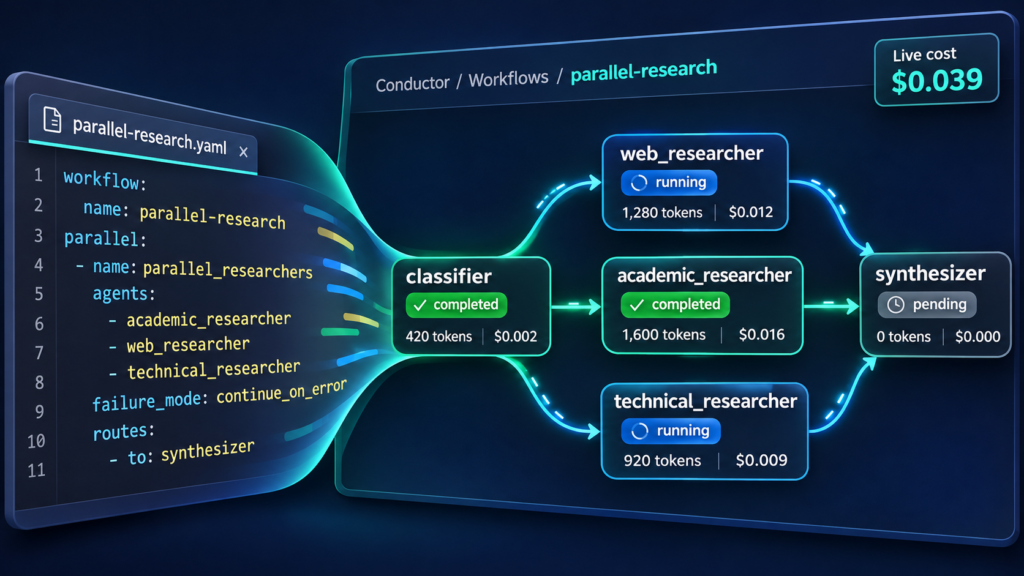
“yaml parallel: - name: parallel_researchers agents: [academic, web, technical] failure_mode: continue_on_error # fail_fast | continue_on_error | all_or_nothing routes: - to: synthesizer “
Each parallel agent receives an immutable snapshot of the context at group start — no race conditions, deterministic results [S5][S7].
Dynamic For-Each Groups
Process variable-length arrays with parallel agent instances spawned at runtime:
“yaml for_each: - name: kpi_processors source: kpi_finder.output.kpis # array reference as: kpi # loop variable max_concurrent: 5 # parallelism limit failure_mode: continue_on_error agent: prompt: 'Analyze KPI: { { kpi.name } } = { { kpi.value } }' output: analysis: type: string “
Use for-each when the item count is unknown at definition time (KPIs, files, user requests). Use static parallel when agents have distinct purposes [S6][S7].
Human-in-the-Loop and Safety
Conductor bakes in guardrails that ad-hoc scripts often miss:
- Human gates:
terminatesteps withstatus: success|failedand structuredreason— distinguishable from normal completion in CLI exit codes and dashboard state [S3, S4] - Dialog mode: Agents can pause for multi-turn conversation when uncertain [S4]
- Budget caps:
budget_usdandbudget_mode: enforce|auditat workflow level [S4] - Iteration/time limits:
max_iterations(default 10, max 500) andtimeout_secondsper workflow [S4] - Checkpointing: Periodic state saves for resumable stalled runs (
conductor resume) [S3, S4]
The web dashboard (conductor run workflow.yaml --web) provides real-time DAG visualization, live streaming, breadcrumb navigation into sub-workflows, and in-browser human gates — zero engine changes required thanks to the pub/sub event system [S2, S3, S9].
MCP and Shell Integration
Agents aren’t limited to text generation. Conductor connects to your existing toolchain:
- MCP servers: Configure stdio or HTTP MCP servers at workflow level; agents call tools via
tools: [server_name]or dedicatedtype: mcpsteps that spend zero LLM tokens on tool execution [S4, S7, S10] - Script steps: Run shell commands directly — linters, test suites, build scripts participate without modification. Route on exit code or parsed JSON stdout [S4, S7, S11]
- Set steps: Derive named values from Jinja2 expressions without an LLM call (computed defaults, feature flags, conditional routing) [S4, S7]
Structured Output for Downstream Consumers
Every agent declares an output schema. Results are validated and accessible as typed data:
“yaml agents: - name: code_reviewer output: findings: type: array items: type: object properties: file: type: string line: type: number severity: type: string enum: [low, medium, high, critical] message: type: string “
Downstream scripts, CI steps, or other workflows consume { { code_reviewer.output.findings } } as structured JSON — no regex parsing of model output [S4, S12].
Sub-Workflows: Composable, Reusable Blocks
Reference external workflow YAML files as black-box steps:
“yaml agents: - name: deep_research type: workflow workflow: ./research-pipeline.yaml input_mapping: topic: "{ { workflow.input.topic } }" depth: "{ { planner.output.depth } }" output: findings: type: string routes: - to: synthesizer “
Sub-workflows inherit the parent’s provider configuration. Recursive composition is supported (depth capped at 10). Registry-hosted workflows (qa-bot@team#v1.2.3) and ad-hoc GitHub references (analysis@myorg/team-a#main) work without local files [S4, S7].
Validation and Authoring Assistance
conductor validate workflow.yaml catches schema errors, stale template references, missing inputs, and undeclared dependencies before runtime. With --environment, it prints a full Execution Resolution report mapping every step to its resolved backend [S3].
Conductor ships a built-in skill for Claude Code and GitHub Copilot CLI. Point your coding agent at the repo and it can build, debug, and improve Conductor workflows for you [S1, S3, S13].
When Conductor Wins (and When It Doesn’t)
Use Conductor when:
- Your workflow has known structure (review loops, research pipelines, plan-then-implement)
- You need predictability, cost control, and auditability
- Team members should be able to read, diff, and review the workflow in a PR
- You want to mix providers/models per agent without rewriting orchestration logic
Consider dynamic orchestration when:
- The task genuinely needs to restructure itself based on discoveries
- You’re exploring unknown problem spaces where the next step can’t be anticipated
- The workflow topology itself is the output
As the Microsoft team puts it: “We’d rather have predictability, cost control, and auditability than replanning flexibility. Conditional routing and loop-back patterns cover more ground than you’d expect.” [S2]
“We looked at other tools, such as Microsoft Agent Framework (MAF)… Conductor is a different surface for similar patterns: a YAML-first CLI for teams who want to compose agents and tools without writing SDK code.”
>
— Microsoft Conductor Team [S2]
“The most common pushback is ‘what about dynamic orchestration?’ Fair question. If your task needs to restructure itself based on what it discovers, let the LLM decide what comes next. But the workflows we keep reaching for (review loops, research pipelines, plan-then-implement) have known structure.”
>
— Microsoft Conductor Team [S2]
Your First Production Workflow
Start with the examples. The repo includes simple-qa.yaml, parallel-research.yaml, design-review.yaml, validator.yaml (code review with LLM validator), and more [S7]. Clone, pick one, run it:
“bash git clone https://github.com/microsoft/conductor.git cd conductor conductor run examples/simple-qa.yaml --input question="What is Python?" “
Then open the dashboard:
“bash conductor run examples/parallel-research.yaml --web --input topic="AI in healthcare" “
The dashboard runs on http://localhost:8080 (auto-assigned port shown in terminal). You’ll see the DAG, agent status, token counts, and cost in real time [S3, S9].
The Bottom Line
Conductor doesn’t replace your editor, CI system, or agent framework. It’s a CLI that reads YAML, calls models, and produces structured output. It plugs into what you already have: MCP servers for tools, shell commands for scripts, JSON schemas for programmatic consumption, and a web dashboard for visibility [S2].
If you’re tired of maintaining Python glue code for agent chains — and want workflows that are version-controlled, diffable, and auditable like infrastructure-as-code — Conductor is the practical path forward.
Sources
- [S1] microsoft/conductor — GitHub Repository — Microsoft (2026-02-02)
- [S2] Conductor: Deterministic orchestration for multi-agent AI workflows — Microsoft Open Source Blog (2026-05-14)
- [S3] CLI Reference — Conductor Documentation — Microsoft (2026-02-02)
- [S4] Workflow Syntax Reference — Conductor Documentation — Microsoft (2026-02-02)
- [S5] Parallel Agent Execution — Conductor Documentation — Microsoft (2026-02-02)
- [S6] Dynamic Parallel Execution (For-Each) — Conductor Documentation — Microsoft (2026-02-02)
- [S7] Conductor Examples — GitHub Repository — Microsoft (2026-02-02)